Data dictionary

What does it do?
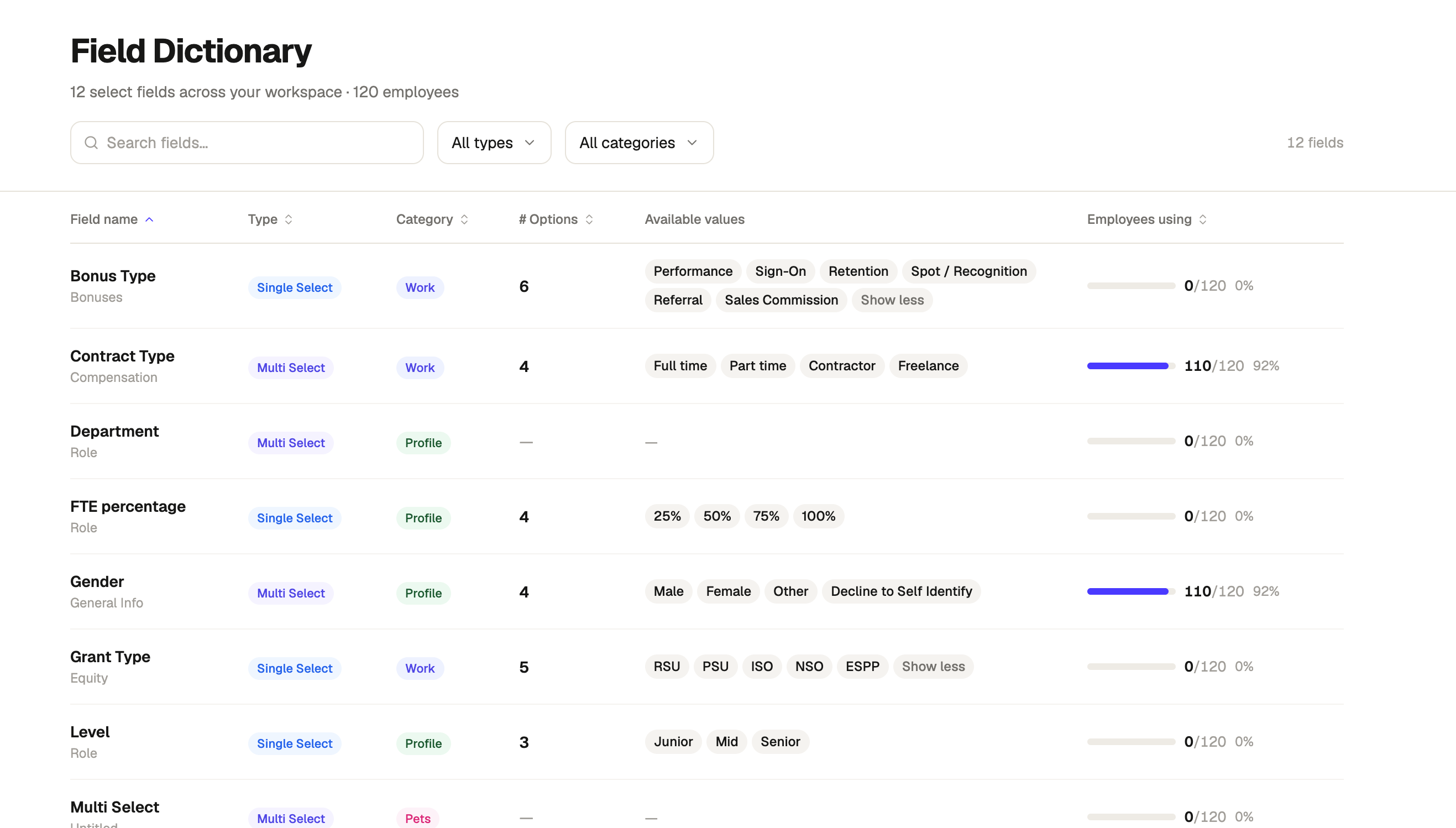
A field configuration audit that catalogues all single and multi-select fields in one searchable table, showing each field's type, category, configured option values, and how many employees actually have a value recorded. It turns a scattered field setup into a single dictionary, making it clear where data is complete, where it's thin, and which fields are configured but barely used. A banner flags fields with no values at all, so data quality gaps surface immediately.
When should it be used?
Whenever you need to understand or clean up how your people data is structured. Most useful before a data import, ahead of building reports that depend on specific fields, or as a periodic data hygiene check. The go-to view for HR ops and admins auditing field consistency, spotting unused or duplicate fields, confirming critical fields are populated before a review cycle, and deciding which fields to standardise or retire.
What's inside?
- A summary line showing total select fields and employees in scope at a glance.
- Search plus type and category filters to narrow down to exactly the fields you need.
- A row per field showing name, category group, type, and number of configured options.
- An available values column listing every option configured for that field.
- An employee usage column with a progress bar, count, and percentage showing how many employees have a value recorded for each field.
- A banner flagging any fields with no recorded values, so data quality gaps are impossible to miss.